合规性不通过,teams 和 outlook 无法使用
· 更新于近期遇到几例居家办公时 teams 和 outlook 无法正常使用的现象:teams 和 outlook 提示需要登录,但尝试登录后提示 “设备必须符合您所在组织的合规要求” 。
故障现象
teams 和 outlook 提示需要登录,但尝试登录后提示 “设备必须符合您所在组织的合规要求” 。受影响的设备几乎都是 HP EliteBook,在公司网络中一切正常,但离开公司后会出现该故障。
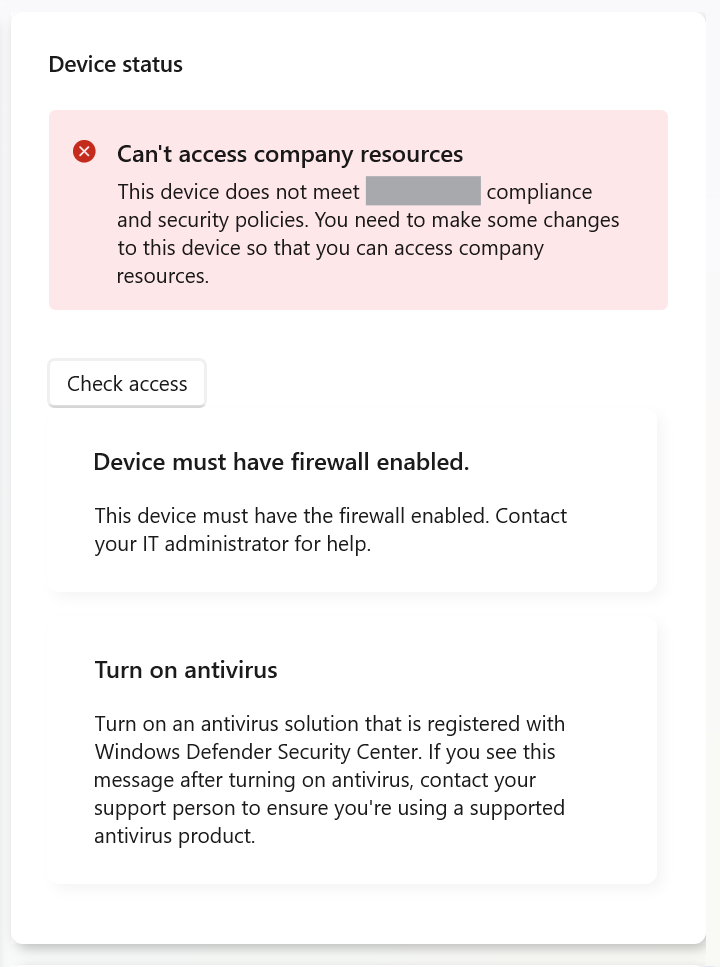
打开公司门户 app 后对合规性进行检查,提示防火墙和防病毒没有启用。
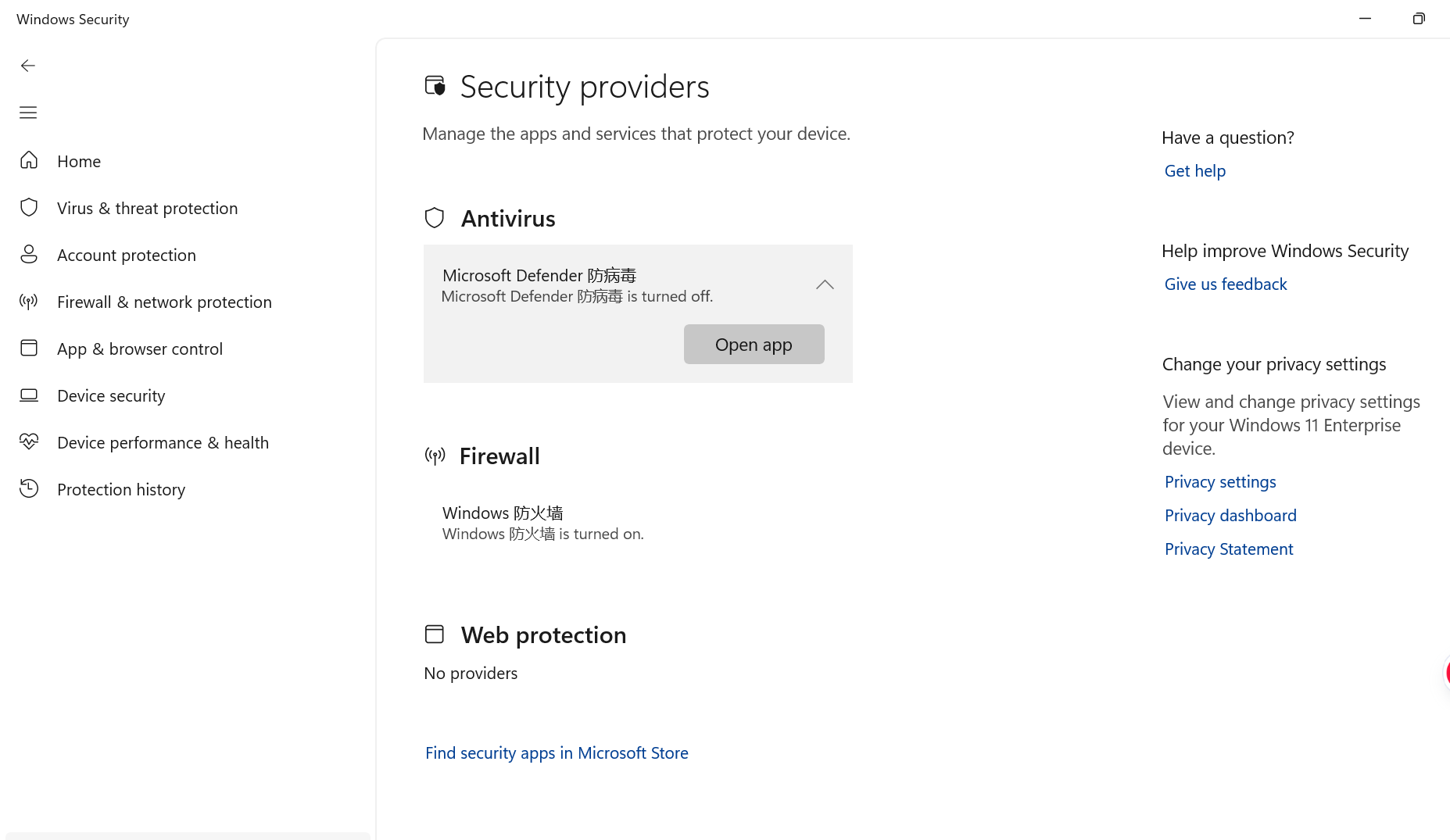
但是 Windows 安全中心的防火墙都是打开状态,这和描述有点不符。依次进入安全中心的 病毒和威胁防护 - 谁在保护我? - 管理提供程序,看到防病毒确实被关了,但实际上没有办法开启,点 Open app 只会重复打开安全中心的病毒和威胁防护页面。
已经确认的有效方案
这又是一个 “微软问题”,现在有两个方案可以尝试,这两个方案都成功修复过该故障。
方案 A
使用管理员权限运行 gpedit.msc,定位到这个位置:
计算机配置
└── 管理模板
    └── Windows 组件
        └── Microsoft Defender 防病毒
把其中的 关闭 Microsoft Defender 防病毒 改为已禁用,然后打开 cmd,执行一次策略更新:
gpupdate /force
如果没有提示重启,可以直接去安全中心检查了,可以看到刚刚关着的防病毒已经开启、公司门户中的状态也正常了,使用热点连接测试也没问题了。
如果还是异常,多次执行策略更新,然后重启设备再重新去公司门户中检查设备状态,有案例在多次重试后成功修复。
方案 B
使用管理员权限打开 ISE,新建一个脚本,把下面的脚本粘贴进去,然后运行:
# Defender / Windows Security Center race condition detector + remediation
# Run elevated or as SYSTEM

$ErrorActionPreference = 'Stop'

$DefenderGuid = '{D68DDC3A-831F-4fae-9E44-DA132C1ACF46}'
$WscRegPath   = "HKLM:\SOFTWARE\Microsoft\Security Center\Provider\Av\$DefenderGuid"

# Exact values observed during this issue
$BrokenState  = 0x060100   # 393472
$HealthyState = 0x061100   # 397568

$LogRoot = 'C:\ProgramData\DefenderWscRace'
$LogFile = Join-Path $LogRoot 'DefenderWscRace.log'

New-Item -Path $LogRoot -ItemType Directory -Force | Out-Null

function Write-Log {
    param([string]$Message)

    $Line = '{0}  {1}' -f (Get-Date -Format 'yyyy-MM-dd HH:mm:ss.fff'), $Message

    Write-Output $Line
    Add-Content -Path $LogFile -Value $Line
}

function Convert-ToHexState {
    param($Value)

    if ($null -eq $Value) {
        return 'N/A'
    }

    return '0x{0:X6}' -f [int]$Value
}

function Get-DefenderWscState {

    $Mp = $null
    $Wmi = $null
    $RegistryState = $null
    $WscService = $null

    try {
        $Mp = Get-MpComputerStatus
    }
    catch {
        Write-Log "Get-MpComputerStatus failed: $($_.Exception.Message)"
    }

    try {
        $Wmi = Get-CimInstance `
            -Namespace 'root\SecurityCenter2' `
            -ClassName 'AntiVirusProduct' |
            Where-Object {
                $_.instanceGuid -eq $DefenderGuid -or
                $_.displayName -match 'Microsoft Defender|Windows Defender'
            } |
            Select-Object -First 1
    }
    catch {
        Write-Log "SecurityCenter2 query failed: $($_.Exception.Message)"
    }

    try {
        if (Test-Path $WscRegPath) {
            $RegistryState = (Get-ItemProperty -Path $WscRegPath -Name 'STATE').STATE
        }
    }
    catch {
        Write-Log "Security Center registry query failed: $($_.Exception.Message)"
    }

    try {
        $WscService = Get-Service -Name 'wscsvc'
    }
    catch {
        Write-Log "Unable to query wscsvc: $($_.Exception.Message)"
    }

    [PSCustomObject]@{
        AMRunningMode              = $Mp.AMRunningMode
        AMServiceEnabled           = $Mp.AMServiceEnabled
        AntivirusEnabled           = $Mp.AntivirusEnabled
        RealTimeProtectionEnabled  = $Mp.RealTimeProtectionEnabled
        PlatformVersion            = $Mp.AMProductVersion
        SignatureVersion           = $Mp.AntivirusSignatureVersion

        WmiDisplayName             = $Wmi.displayName
        WmiProductState            = $Wmi.productState
        WmiProductStateHex         = Convert-ToHexState $Wmi.productState

        RegistryState              = $RegistryState
        RegistryStateHex           = Convert-ToHexState $RegistryState

        WscServiceStatus           = $WscService.Status
    }
}

function Test-DefenderReallyOn {
    param($State)

    return (
        $State.AMServiceEnabled -eq $true -and
        $State.AntivirusEnabled -eq $true -and
        $State.RealTimeProtectionEnabled -eq $true -and
        $State.AMRunningMode -eq 'Normal'
    )
}

function Test-WscBroken {
    param($State)

    $WmiBroken = (
        $null -ne $State.WmiProductState -and
        [int]$State.WmiProductState -eq $BrokenState
    )

    $RegistryBroken = (
        $null -ne $State.RegistryState -and
        [int]$State.RegistryState -eq $BrokenState
    )

    return ($WmiBroken -or $RegistryBroken)
}

function Test-WscHealthy {
    param($State)

    $WmiHealthy = (
        $null -ne $State.WmiProductState -and
        [int]$State.WmiProductState -eq $HealthyState
    )

    $RegistryHealthy = (
        $null -ne $State.RegistryState -and
        [int]$State.RegistryState -eq $HealthyState
    )

    return ($WmiHealthy -and $RegistryHealthy)
}

Write-Log '============================================================'
Write-Log 'Starting Defender / Windows Security Center health check'

$Before = Get-DefenderWscState

Write-Log "Defender platform       : $($Before.PlatformVersion)"
Write-Log "AM running mode         : $($Before.AMRunningMode)"
Write-Log "AM service enabled      : $($Before.AMServiceEnabled)"
Write-Log "Antivirus enabled       : $($Before.AntivirusEnabled)"
Write-Log "Real time protection    : $($Before.RealTimeProtectionEnabled)"
Write-Log "WSC service             : $($Before.WscServiceStatus)"
Write-Log "WMI productState        : $($Before.WmiProductState) [$($Before.WmiProductStateHex)]"
Write-Log "Registry STATE          : $($Before.RegistryState) [$($Before.RegistryStateHex)]"

$DefenderReallyOn = Test-DefenderReallyOn $Before
$WscBroken        = Test-WscBroken $Before

if (-not $DefenderReallyOn) {

    Write-Log 'Defender itself is not reporting a normal active state.'
    Write-Log 'This does NOT match the WSC race condition. No remediation performed.'

    exit 0
}

if (-not $WscBroken) {

    Write-Log 'Defender is active and the known broken WSC state was not detected.'
    Write-Log 'No remediation required.'

    exit 0
}

Write-Log '*** RACE CONDITION DETECTED ***'
Write-Log 'Defender reports itself active but Windows Security Center reports 0x060100.'

#
# Make sure Security Center itself is running first.
#

try {

    $WscSvc = Get-Service -Name 'wscsvc'

    if ($WscSvc.Status -ne 'Running') {

        Write-Log 'Windows Security Center service is not running. Starting it.'

        Start-Service -Name 'wscsvc'

        Start-Sleep -Seconds 15

        $AfterWscStart = Get-DefenderWscState

        Write-Log "After starting wscsvc, WMI      : $($AfterWscStart.WmiProductStateHex)"
        Write-Log "After starting wscsvc, Registry : $($AfterWscStart.RegistryStateHex)"

        if (Test-WscHealthy $AfterWscStart) {

            Write-Log 'Windows Security Center state recovered without resetting Defender.'
            exit 0
        }
    }
}
catch {
    Write-Log "Could not start/check wscsvc: $($_.Exception.Message)"
}

#
# Confirm the mismatch still exists before doing ResetPlatform
#

$Confirm = Get-DefenderWscState

if (-not (Test-DefenderReallyOn $Confirm)) {

    Write-Log 'Defender runtime state changed before remediation.'
    Write-Log 'ResetPlatform cancelled.'

    exit 1
}

if (-not (Test-WscBroken $Confirm)) {

    Write-Log 'WSC state recovered by itself before remediation.'
    exit 0
}

#
# Known workaround
#

$MpCmdRun = Join-Path $env:ProgramFiles 'Windows Defender\MpCmdRun.exe'

if (-not (Test-Path $MpCmdRun)) {

    Write-Log "MpCmdRun.exe not found at $MpCmdRun"
    exit 1
}

Write-Log 'Running MpCmdRun.exe -ResetPlatform'
Write-Log "Platform before reset: $($Confirm.PlatformVersion)"

try {

    $Process = Start-Process `
        -FilePath $MpCmdRun `
        -ArgumentList '-ResetPlatform' `
        -Wait `
        -PassThru `
        -NoNewWindow

    Write-Log "ResetPlatform exit code: $($Process.ExitCode)"
}
catch {

    Write-Log "ResetPlatform failed: $($_.Exception.Message)"
    exit 1
}

#
# Defender and WSC can take a little time to settle.
#

Write-Log 'Waiting for Defender and Windows Security Center to republish state.'

$Recovered = $false
$After = $null

for ($Attempt = 1; $Attempt -le 18; $Attempt++) {

    Start-Sleep -Seconds 5

    try {

        $After = Get-DefenderWscState

        Write-Log "Check $Attempt | WMI=$($After.WmiProductStateHex) Registry=$($After.RegistryStateHex) Platform=$($After.PlatformVersion)"

        if (
            (Test-DefenderReallyOn $After) -and
            (Test-WscHealthy $After)
        ) {

            $Recovered = $true
            break
        }
    }
    catch {
        Write-Log "Post repair check $Attempt failed: $($_.Exception.Message)"
    }
}

if ($Recovered) {

    Write-Log '*** REMEDIATION SUCCESSFUL ***'
    Write-Log "Platform after reset : $($After.PlatformVersion)"
    Write-Log "WMI productState      : $($After.WmiProductStateHex)"
    Write-Log "Registry STATE        : $($After.RegistryStateHex)"

    exit 0
}

Write-Log '*** REMEDIATION FAILED ***'

if ($null -ne $After) {
    Write-Log "Defender platform : $($After.PlatformVersion)"
    Write-Log "WMI productState  : $($After.WmiProductStateHex)"
    Write-Log "Registry STATE    : $($After.RegistryStateHex)"
}

exit 1
脚本日志保存在 C:\ProgramData\DefenderWscRace\DefenderWscRace.log。之后防病毒开关应该会被打开,可以去检查下功能是否都恢复正常了。